

Teams and business owners can now work from anywhere, yet customers expect fast, professional phone responses. If you use a personal cell number, it can lead to missed calls, confused contacts, or blurred work and personal life. However, a dedicated virtual phone number gives your business a steady identity across all devices.
It takes a few minutes and almost no effort to buy a virtual phone number and set it up, but you’ll feel the change right away. Here’s everything you need to know about it.
What Is a Virtual Phone Number and How Does It Work?
A virtual phone number is a cloud-based business number that lets calls and messages reach you through the internet instead of physical phone lines or a SIM card. It’s not tied to a fixed location or a single device. You can answer calls on a laptop while traveling, on a mobile app, or even on a digital desk phone, all using the same number.
Here’s how it works in practice:
- A customer dials your virtual number, for example, a NY area code.
- VoIP (Voice over Internet Protocol), which means calling over the internet, converts your voice into digital packets.
- The provider receives the call, follows your routing rules, and delivers it to the devices you choose.
To get started, you need a reliable internet connection, access to the provider’s app or online dashboard, and a device to answer calls. Some virtual phone number providers also include HD audio and noise suppression (see their documentation or VoIP guides for details).
Virtual Numbers vs Traditional Numbers
From a customer’s perspective, virtual numbers feel just like traditional phone numbers. The differences appear on the business side, so here is a quick cheat sheet:
- Portability – Virtual numbers move with you instead of staying fixed.
- Scalability – They can add users or lines instantly without requiring extra hardware.
- Device flexibility – They work on mobile devices instead of being tied to a desk phone.
- Setup speed – They go live within minutes instead of taking days to set up.
- Cost – They run on subscriptions with no hardware or line fees.
- Routing capability – They let you set rules, queues, and multi-device options, rather than just forwarding calls.
To see how this plays out in a real-world scenario, consider a small sales team relying on a single desk phone. Previously, when one person was away or on another call, customers got a busy signal or went unanswered. After switching to a shared business phone number with routing, calls connected to any available team member, so every customer reached someone.
Keep in mind that virtual numbers rely on internet access, and emergency calling may require a special setup, which we will cover later.
How to Get a Virtual Phone Number
A virtual phone number is simple to set up and does not require any extra hardware. Your business line can go live in minutes and work on laptops, phones, or tablets. And if you have a reliable provider, you can actually enjoy managing your business communications.
Here’s how to get online phone numbers:
Step 1: Identify Your Business Communication Needs
Start by thinking about why your business needs a virtual number. Are you handling sales calls, providing customer support, hiring remotely, or managing multiple locations? Clear goals help determine the features and setup you require. A solo consultant might want a simple line for client calls and voicemail transcription, but a three-person support team may require shared inboxes, call queues, and routing rules.
Translate these goals into practical requirements. Use this checklist to guide your planning:
- Team size and roles
- Shared inbox or queue needs
- Business hours and after-hours handling
- Call routing rules and overflow paths
- SMS/MMS support
- Recording or compliance requirements
- CRM or help desk integrations
- International calling needs
Step 2: Select a Reliable Virtual Phone Service Provider
Reliable call quality and consistent service make a big difference for your business. Very cheap or free options may seem tempting, but these providers may recycle online telephone numbers, limit features, or offer little support, which can undermine your professionalism.
Here’s how to evaluate potential providers:
- Call quality and HD audio support
- Service uptime and reliability guarantees
- Admin dashboard and user controls
- Transparent pricing with no hidden fees
- Customer support availability and responsiveness
- Scalability to add numbers and users
- Security and compliance measures
Also, check reviews from trusted sources or industry publications to choose a provider that delivers reliable and professional service.
Step 3: Choose Your Virtual Phone Number
The type of number you select affects how customers perceive your business and whether they feel comfortable calling. Below are five common types of virtual numbers to consider.
Important note: Use a virtual phone number consistently across your website, invoices, and business profiles. This way, you avoid confusion and reinforce a professional image.
Local Phone Number
Local numbers show that your business is nearby, helping customers feel more comfortable picking up the phone. They work well for companies offering local services, region-based sales, or any situation where a familiar number encourages people to answer.
For example, a home services team can use a city area code even while working remotely.
Toll-Free Telephone Number
Toll-free numbers help your business feel national and professional, making them ideal for support lines or companies serving clients across the country. Because calls are free, it’s easier for people to reach you, which improves accessibility and customer satisfaction. For example, a nationwide ecommerce store can use a toll-free number so customers from any region can call about orders or shipping without paying for the call.
Pricing and call limits vary by provider, so be sure to review the details when you get a virtual number plan.
Vanity Phone Number
Vanity numbers turn your phone line into a memorable marketing tool and work well for ads, billboards, or radio campaigns where people need to remember your brand. They spell out words or use simple, easy-to-remember sequences like 1-888-FLOWERS, so prospects can recall your business more easily.
A vanity number is not essential for every business, but it can give campaigns or customer promotions a boost and help your brand stick in people’s minds.
International Phone Number
International numbers let businesses reach customers in other countries and create a local presence. They work well for businesses with clients or teams spread across regions. Since coverage and pricing vary by location, check your provider before you commit.
For example, a software company can set up an international hotline so customers in Europe, Asia, and the US can reach support.
Ported Phone Number
You can port your existing number when you switch to a new virtual provider. That way, your customers can still reach you and your brand stays familiar. Number porting usually takes longer than setting up a new cell phone number, but it helps to plan ahead.
Here’s a checklist to make the process run smoothly:
- Gather current carrier information.
- Obtain a Letter of Authorization.
- Confirm billing details with your provider.
- Keep your old service active until porting completes.
Step 4: Install Mobile or Desktop Apps to Make Calls
Your virtual business number works on many devices, so team members can take calls wherever they are. You can use a smartphone app, a laptop, a browser, or a VoIP desk phone, whichever suits your setup.
Getting started is usually simple. Install the app, log in, allow microphone and notification access, and try it out. For example, you could handle client calls on a laptop while working at your desk and switch to your mobile when you move around.
Step 5: Start Making and Receiving Business Calls
Before you share your virtual number, run a test to make sure everything works as it should. Confirm that voicemail greetings are set, calls go to the right people, texts are sent correctly, and work hours match your availability.
Check these items to make sure your internet number is ready:
- Place an inbound call to see who answers.
- Make an outbound call from the system.
- Record and review voicemail greetings.
- Transfer a call to another user.
- Test after-hours routing to voicemail or backup line.
- Send and receive SMS messages.
- Verify that caller ID displays correctly for outgoing calls.
How Much Does a Virtual Phone Number Cost for a Small Business?
A virtual phone number usually runs on a simple subscription plan. Most providers charge per user, with optional costs for extra numbers or advanced tools. Some also add fees for toll-free calls or international minutes.
Common factors that influence pricing include:
- Number of users or seats
- Extra local, toll-free, or international numbers
- Toll-free or international calling
- Call recording or compliance features
- Analytics and reporting needs
- Integrations with CRM or help desk tools
Cost predictability and the time you save matter as much as the monthly fee, because a clear plan lets you map out expenses.
Omnivoice offers straightforward plans. The Solo plan costs $9/month and suits one user with 1,000 minutes. The Team plan moves to $19/month and covers three users with 5,000 minutes. For larger groups, the Company plan sits at $99/month and offers unlimited users, unlimited minutes, priority support, and a guided setup.
Benefits You Get with a Virtual Phone Number
A virtual phone number helps your business stay reachable and trustworthy in moments that affect sales. You see the real value once everything lines up the way we covered earlier, with routing that fits your workflow, a clear schedule, and simple access for your team.
Work From Anywhere with Mobile and Internet Calling
A virtual phone number keeps your business reachable no matter where your team works. You could take a call at your desk in the morning, pick up another on your laptop while moving between meetings, and wrap up the day on a mobile. Clients get a consistent experience and never wonder who to call.
Create a Professional Business Presence
A dedicated business number shows clients they can rely on you from the very first call. Even small adjustments can make your business appear more professional and build client trust. For example, greetings, routing rules, and timely follow-ups make every conversation feel consistent.
A few things to check:
- Use a clear, welcoming greeting.
- Set accurate business hours.
- Make sure calls go to the right person.
- Reply quickly to voicemail or messages.
Scale Your Business Phone System as You Grow
With a VoIP phone system, your business can grow without swapping hardware. You might start with one number as a solo founder, then bring on a few support team members who each get their own line. Later, you can add separate numbers for sales or customer questions, and every call still reaches the right person.
Lower Costs Compared to Traditional Systems
A virtual phone system can cut costs because there’s no need for desk phones, extra wiring, or a complicated PBX. You pay for the users and features your team actually uses.
Even though virtual services are generally cheaper than traditional lines, you still need to choose a reliable provider. Some services may look appealing, but unreliable calls or dropped connections can end up costing far more than hardware ever would.
Enjoy Security and Privacy for Business Communications Online
Using a dedicated virtual number keeps your personal mobile phone private and your work calls professional. It also helps limit interruptions outside business hours, which is something many remote workers struggle with, as one in five report difficulty unplugging after hours.
Do:
- Keep personal and business lines separate.
- Set clear schedules for calls and messages.
- Protect your personal number by avoiding public posts.
Don’t:
- Rely on free or unreliable numbers for important calls.
- Use the same number for multiple unrelated businesses.
- Overlook privacy settings on your chosen service.
Features That Power Your Virtual Number
Start by focusing on the features that have the biggest impact on daily operations, such as:
Call Forwarding and Call Routing
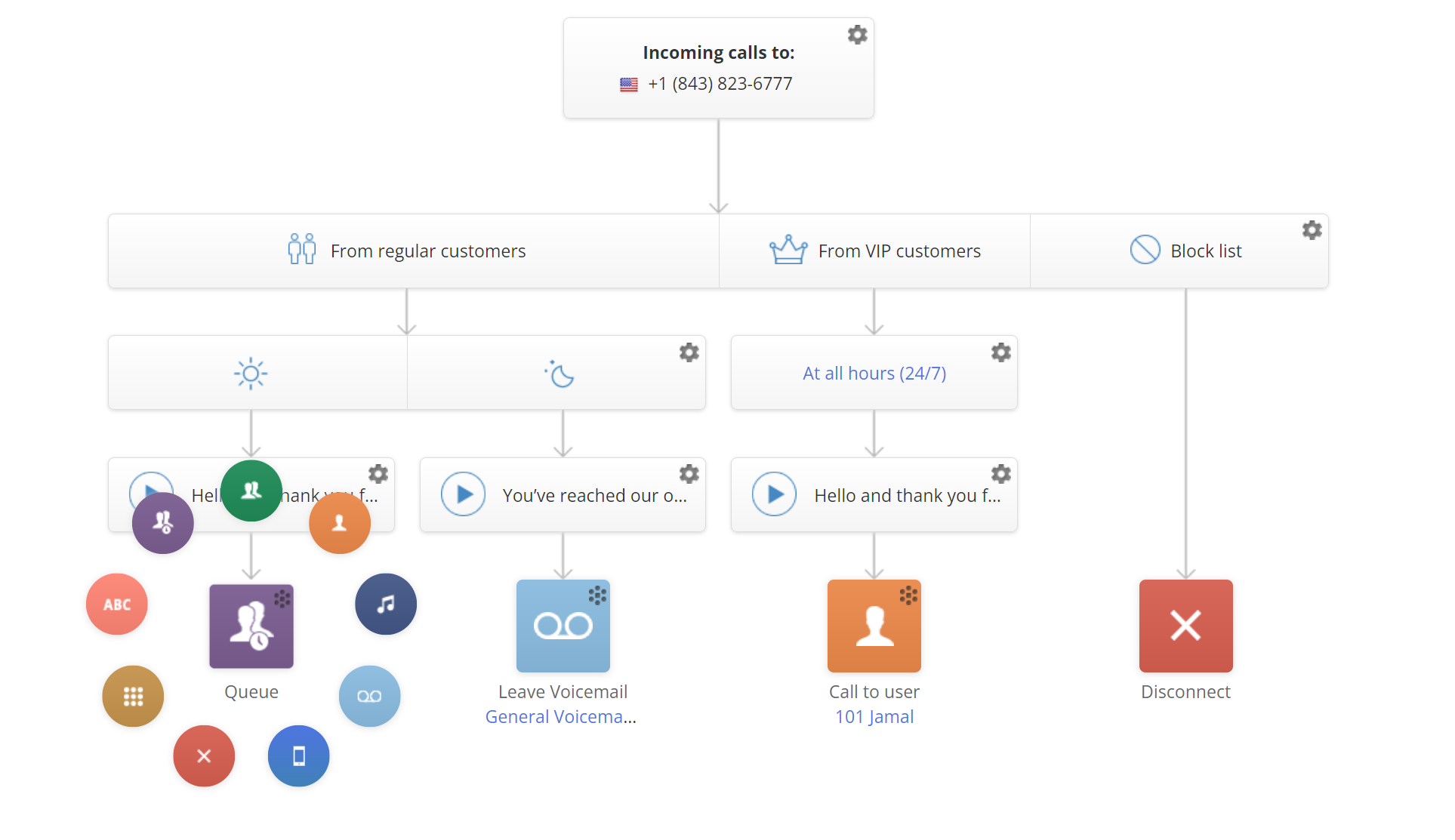
You can forward calls to a colleague when you step away, so important conversations never get missed. Advanced tools let you route phone calls based on business hours, caller type, or department. Each call reaches the right person automatically and keeps your team on top of every interaction.
For example, calls from VIP clients can be forwarded directly to the owner for immediate attention. Or general support calls can be routed to the team during the workday and sent to voicemail after hours.
Interactive Voice Response for Smart Call Handling
An IVR menu guides callers to the correct department using simple options, like “Press 1 for Sales, press 2 for Support, or press 3 for Billing.” You can set up menus with three to five options to keep callers from getting frustrated. With a clear structure, small teams can manage more calls and ensure customers get help the first time they reach out.
Voicemail Transcription and Call Recording
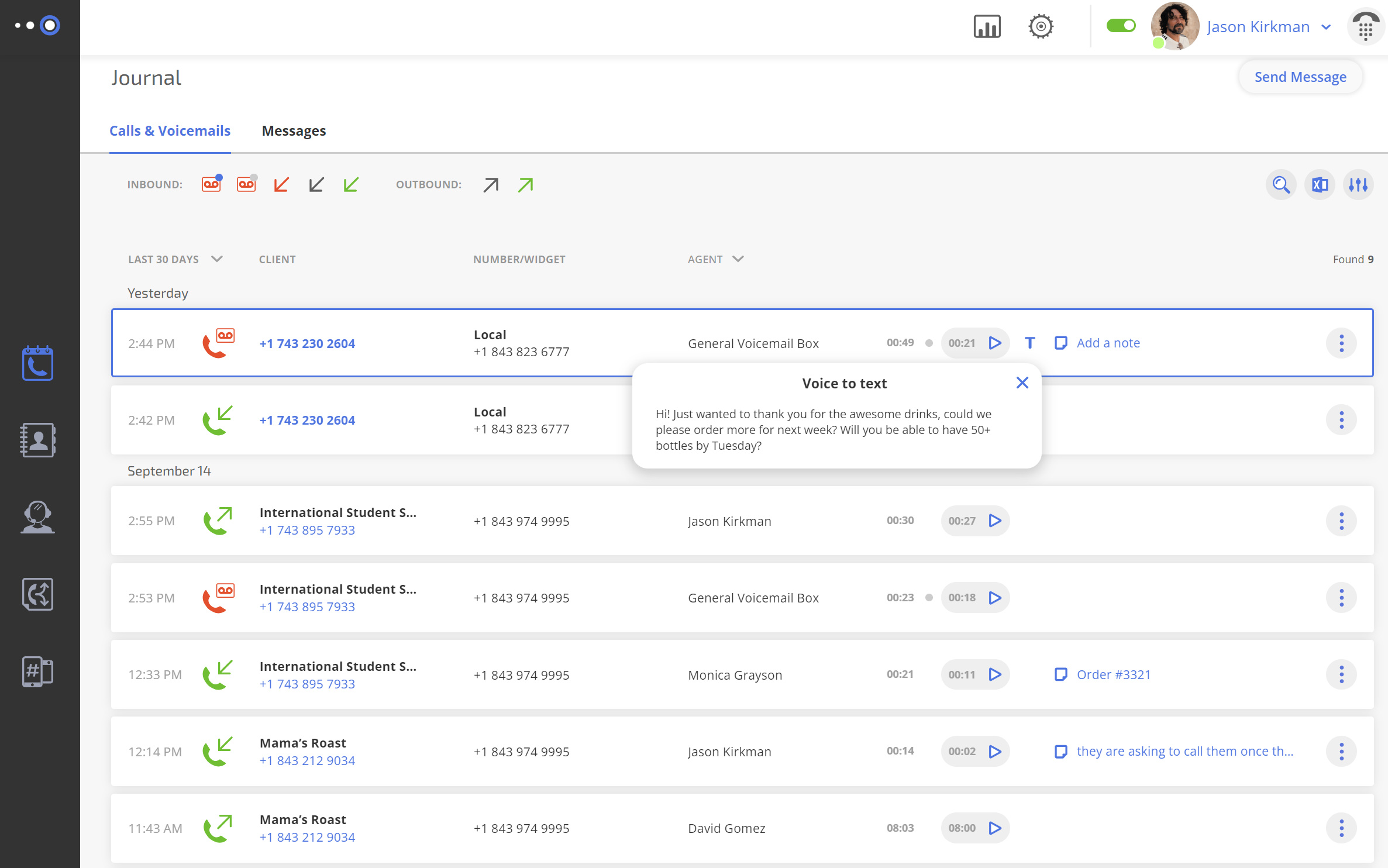
With voicemail transcription, messages convert to text for faster review and quicker follow-up. The call recording feature supports training, quality assurance, and documentation. Together, these features help teams capture critical information and improve customer service.
Just be sure to confirm local consent rules before recording calls.
CRM Integrations
Connecting your virtual phone system to a CRM keeps customer details at hand. For example, when a call comes in, the agent can see the client’s contact information and previous support tickets right away, so they can answer with context and add notes without switching screens.
Call Analytics and Reporting
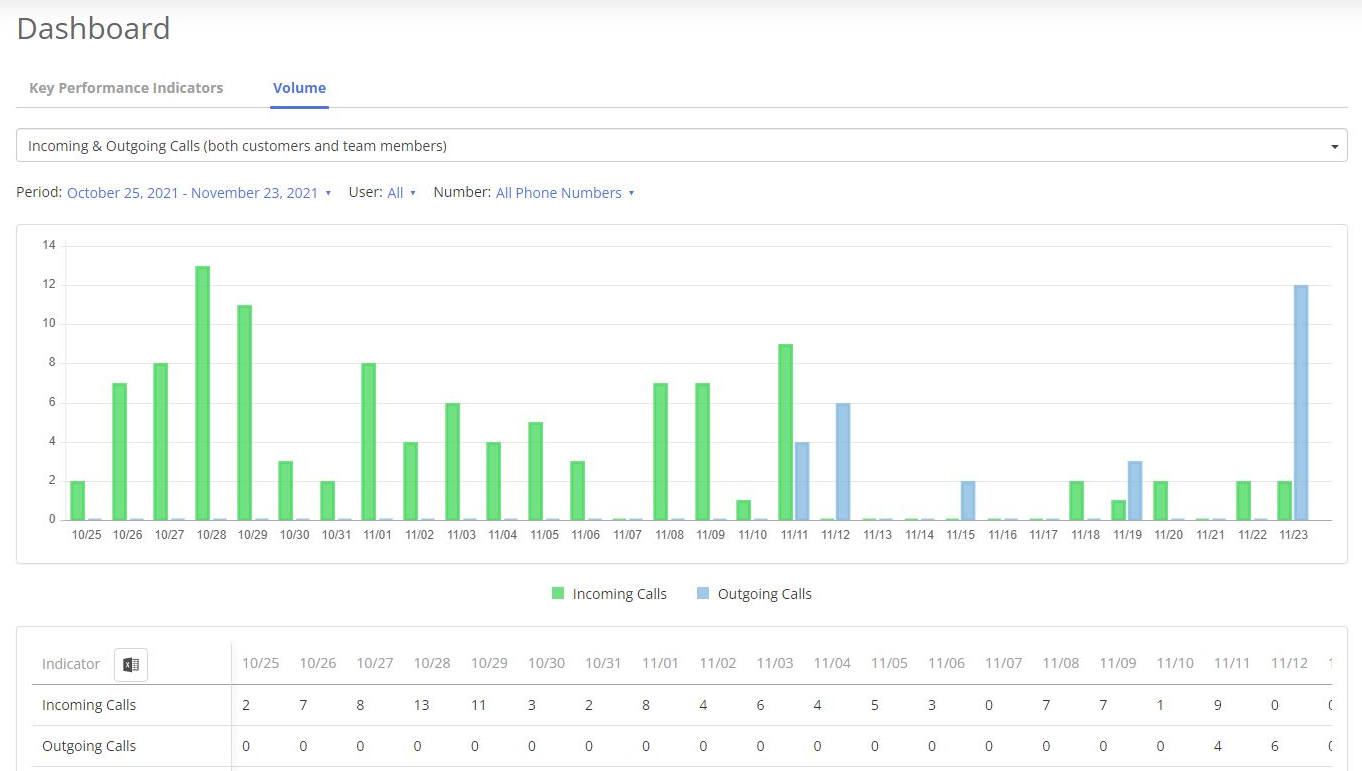
Call analytics show when calls come in, how many get missed, and which lines get the most traffic. You can use that data on your dashboard to spot busy times and make sure someone is always available for customers. For instance, if Mondays get hectic, you can make sure someone extra is available so no customer waits.
How to Set Up Your Virtual Phone System Effectively for a Small Team
Getting a virtual number is quick and simple, but making it feel professional takes a little setup. You don’t need to do everything at once. Just start with a few basic steps, and add more features as your business grows.
Here’s how to keep your business organized and make clients happy:
- Choose a main number – Pick a local, toll-free, or vanity number that clients see everywhere so they recognize it instantly.
- Set hours and routing – Decide when calls should be answered and who handles them. Calls outside hours go to voicemail, so nothing gets lost.
- Give your team access – Let each teammate have a direct line or shared access so someone is always available for callers.
- Turn on text messaging – Quick SMS updates or confirmations save time and make clients feel connected.
- Record a friendly voicemail – Even missed calls leave a good impression when the message is clear, approachable, and helpful.
Possible Downsides of Using Virtual Phone Numbers and How to Avoid Them
Virtual phone numbers offer flexibility, but they are not without challenges.
Internet Bandwidth and Call Quality Requirements
Call quality depends on your internet connection, so if it’s shaky, it can make conversations frustrating, especially for teams that talk to clients a lot. However, you can make a big difference with a few tweaks:
- Plug in a wired connection if you can.
- Keep bandwidth-heavy apps closed.
- Place your router in a central spot.
Learning Curve for Advanced Phone Features
Some of the advanced features, like call routing, IVR menus, and integrations, can feel overwhelming at first. A good approach is to start simple and add more as you go. For example:
- Set up basic routing rules.
- Give your team shared access so everyone can pick up calls when needed.
- Once everyone is comfortable, add integrations and analytics to get more out of the system.
Emergency Calling Limitations
Virtual numbers don’t always share your exact location with emergency services the way a landline number does. To stay safe, make sure your address is up to date with your provider, teach your team what to do in an emergency, and keep a backup line at any physical location.
Ready to Get a Virtual Number?
Getting a virtual phone number is easier than it seems when you break it down. You just start by picking the right type of number for your business and a provider you can trust. Set up call routing, define business hours, turn on texting, and record a friendly voicemail. Finish it with a few test calls to know everything works the way you want.
Once your system is ready, your team stays reachable while personal numbers remain private, so each caller gets a professional experience. You can see the difference for yourself – get a number online with Omnivoice and experience how quickly it improves your business communication.
FAQ
New virtual numbers with Omnivoice are typically activated within minutes. If you decide to port your existing number , the process may take a bit longer, but it is usually completed within a week.
No, most people will not notice a difference because it feels just like a regular call. The main changes happen on your side, such as how virtual phone calls are routed or how voicemails are handled. For the best experience, make sure your internet connection is stable and test calls on different devices.
It can work, but it depends on the platform and your provider. To avoid problems, use a virtual number you plan to keep for a long time and check the platform’s current rules before listing it. Also, keep your cell phone information consistent across all business listings so customers can reach you easily.


FAST • SECURE • RELIABLE
business communications
